Recover deleted items: registrations, classes, sessions, and payments
Deleted items are not immediately gone. Zooza keeps them in Trash for 30 days, after which they are permanently removed and cannot be recovered. During those 30 days you can restore any item with a single click.
Access: Settings → Tools → Trash. Requires
delete_coursespermission (owner role).
Cancelled vs. deleted vs. permanently removed — what is the difference?
This is the most common source of confusion. A registration (or class) can be in one of three states that look similar but behave very differently:
| State | What happened | Where to find it | Can it be undone? |
|---|---|---|---|
| Cancelled | The registration was cancelled — client is no longer attending, but the record still exists | Registrations list with status filter set to Cancelled | Yes — change status back to Active manually |
| Deleted (in Trash) | The registration was moved to Trash | Settings → Tools → Trash | Yes — within 30 days |
| Permanently removed | 30 days have passed since deletion, or it was hard-deleted | Nowhere — it is gone | No |
If you cannot find a registration in the main list, check in this order:
- Registrations list → change the status filter to All or Cancelled — it may still be there as cancelled.
- Navigate directly to
#registrations?status=deletedin your browser URL (add?status=deletedto the registrations page URL) — deleted registrations are viewable indefinitely via this path, even beyond the 30-day Trash window. - Settings → Tools → Trash — to restore a deleted registration, it must be within the 30-day window.
Note: The Deleted status filter was removed from the Bookings list UI. The only way to view deleted registrations is via the URL path above or via Settings → Tools → Trash. Deleted registrations are not permanently gone after 30 days in terms of visibility — they remain viewable via the URL path. However, they can only be restored within 30 days of deletion.
What can be restored
| Type | What it is |
|---|---|
| Session (event) | A single session within a class |
| Class (schedule) | An entire class with all its sessions |
| Registration | A client's booking on a class |
| Programme (course) | A whole programme, with everything under it. Added October 2026 |
| Cancelled payment | A scheduled payment that was cancelled via bulk cancel or the cancel action on a booking |
| Contact | An enquiry from your website's contact form |
Items deleted more than 30 days ago are permanently gone and cannot be recovered from here. The banner on the screen lists the current set, so trust it over any list written down — it has grown twice in 2026.
A programme is the exception to "permanently gone". Nothing actually hard-deletes a programme — after 30 days it simply stops appearing in Trash and can no longer be restored from there. Its row, and the bookings under it, are still in the database. If you genuinely need an old programme back after the window, ask support before assuming it is lost.
A deleted programme while it sits in Trash
As of late October 2026 a deleted programme is properly closed rather than just hidden:
- It cannot be edited. Edits are refused rather than silently accepted. This was a real problem: on one account 21 changes were saved to a programme that had already been deleted, and nobody was told.
- It takes no new bookings — not from the admin app, not from the booking widget.
- Opening it in the app shows "page not found", which is how you find out a colleague deleted it.
- Bookings already under it keep working. Nothing is cancelled by deleting the programme.
Two gaps worth knowing about, because Trash shows them as blank: a programme's Trash row carries no "deleted by" and no previous status. Zooza never recorded either for programmes, so there is nothing to show and nothing to restore it to beyond "active".
Why is the Restore button greyed out?
The Restore button is inactive when one of these conditions is true:
- The class the registration belonged to no longer exists. A registration cannot be restored if its parent class has been permanently deleted. Restore the class first, then restore the registration.
- The item's 30-day window has expired. The record is visible temporarily in some views but can no longer be recovered.
- You do not have the required permission. Restore requires the
delete_coursespermission (owner role). Ask your account owner to restore the item for you.
Restoring a single item
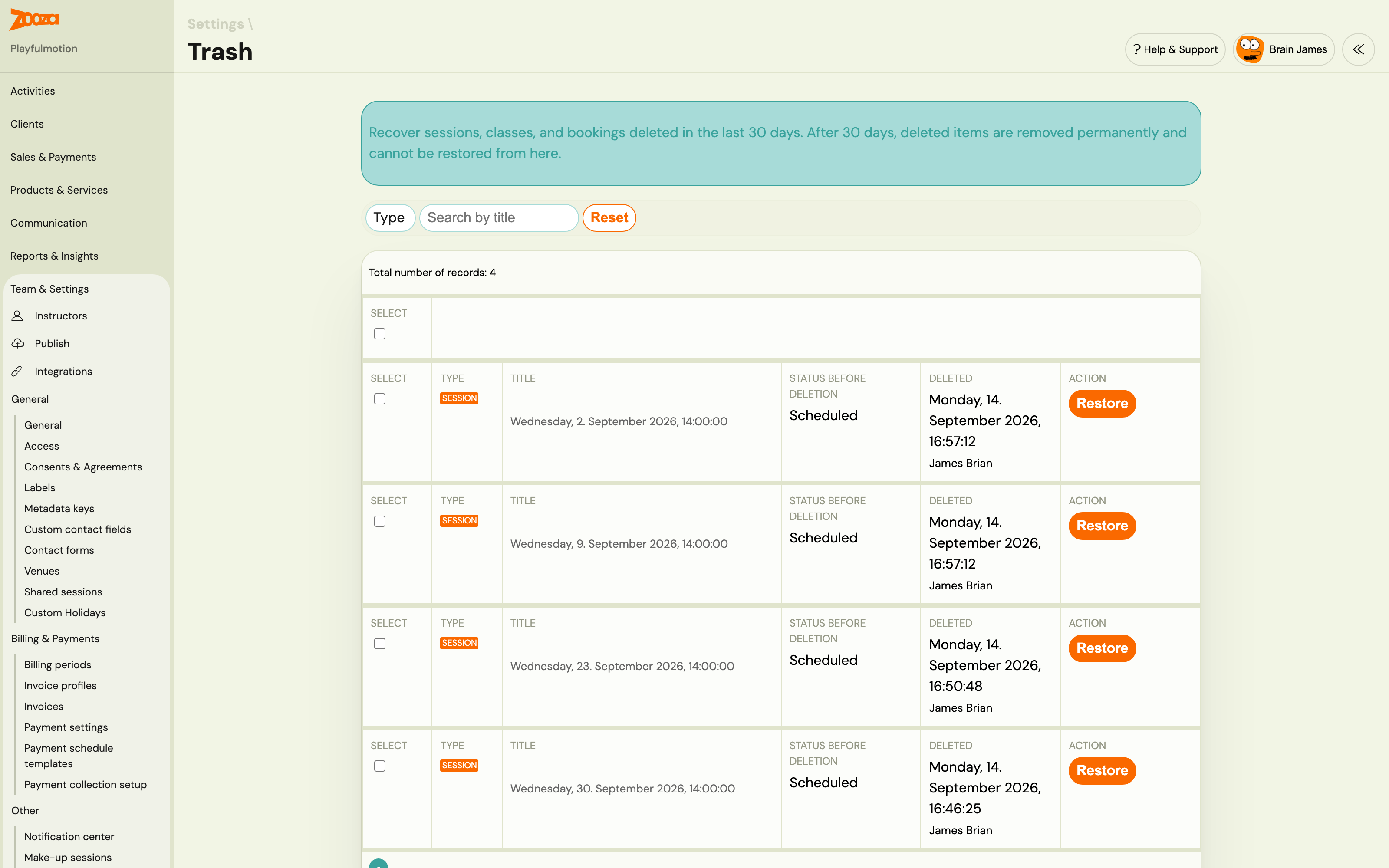
- Go to Settings → Tools → Trash.
- Use the Type filter or the search field to find the item.
- Click Restore on the row.
- Confirm the action in the dialog.
The item is removed from the Trash list and restored to its original location in the app.
Note: Restore is a database-level operation. It does not re-send notifications, re-trigger integrations, or cascade to dependent records. For example, restoring a class does not automatically restore registrations that were on it — restore each type separately if needed.
Restoring multiple items at once
- Check the boxes next to the items you want to restore. Use the header checkbox to select all items on the current page.
- The bulk action bar appears above the table showing the count.
- Click Restore selected.
- Confirm in the dialog.
The system processes each item independently. If some succeed and others fail, you get a success count plus individual error messages for the failures. Successfully restored items are removed from the list; failed items stay so you can retry or investigate.
The bulk restore is capped at 100 items per action.
Filtering the list
| Filter | Options |
|---|---|
| Type | All, Session, Class, Registration, Cancelled payments |
| Search | Free text — searches by title |
Pagination is standard. Changing pages clears any checkboxes you have selected.
Empty state
If the list shows "No items have been deleted in the last 30 days", there is nothing to recover. Items deleted before the 30-day window are gone permanently.

Bulk-cancelling scheduled payments
You can cancel multiple upcoming scheduled payments at once from the Scheduled payments overview screen. Cancelled payments go to Trash — they are not deleted permanently and can be restored within 30 days.
Navigation: Go to Payments → Scheduled payments overview. Select the payments you want to cancel, then choose Bulk Edit → Cancel payment → Continue.

After confirming, the selected payments disappear from the Scheduled payments overview. They are moved to Trash under the Cancelled payments type.

Each row in the Trash list shows:
- Title — client name and class
- Status before — the original status (always Scheduled)
- Deleted — date and time of cancellation, and who performed the action
- Restore button — active for 30 days from the cancellation date
Restoring a cancelled payment sets it back to Scheduled. The client's outstanding balance is updated immediately. No payment notification is sent on restore.
Bookings left behind by a deleted programme
A recurring puzzle, usually reported as "I have bookings called undefined that I cannot open, with money outstanding, and they keep appearing in my unpaid list."
That is what a booking looks like when its programme was deleted and its class archived, often months earlier. The bookings are not broken and they are not a leftover bug — Zooza keeps them deliberately, so that anything needing to be reversed still can be.
What is true of them:
- They are not active. No notifications are sent to those clients, and they are excluded from every report in the app, because the programme they belong to is gone.
- You cannot open the booking or zero its balance. Setting the debt to 0 does not save; it reverts to the original fee.
- They may still surface in searches and in Zooza AI, which is how most people discover them.
Decide which of the two it is:
- The money still matters — somebody genuinely owes it, or it needs refunding. Restore the programme from Trash and unarchive the class, and the bookings become workable again.
- It is history — the term is long over and the balance is noise. Leave them. They affect no report and nobody is being chased for them.
If they are cluttering up Zooza AI's answers, say so to support. These bookings can be put out of the assistant's reach so it stops offering them as live work.
What restore does not do
- No notification to clients. Restoring a registration does not send a confirmation email to the client.
- No cascading restore. Restoring a class does not restore the registrations that were on it. Restore each record type separately.
- No integration triggers. GoCardless mandates, Stripe charges, and invoicing integrations are not re-triggered.
- No undo for permanent deletions. Items deleted more than 30 days ago cannot be recovered from Trash or by Zooza support.
Related
- Archive or delete a programme — how to safely deactivate programmes
- Settings — overview of all settings sections