Cancellation limit settings
Zooza lets you define how late a client can cancel a scheduled session. This is a global setting — it applies to all programmes in your account. You can use it to protect your schedule, set fair make-up session rules, and control what clients see when they try to cancel too late.
Go to Settings → Programmes to configure these options.
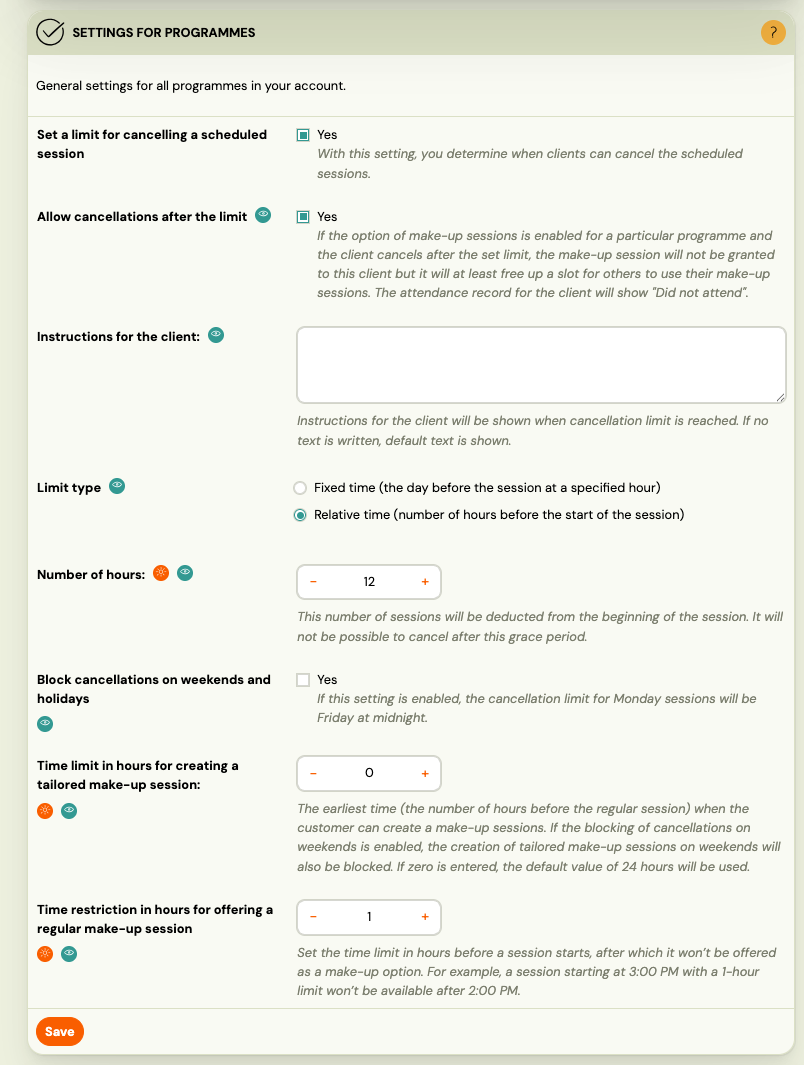
Enable the cancellation limit
Toggle Set a limit for cancelling a scheduled session to Yes to activate the feature. Once enabled, clients cannot cancel a session after the limit has passed — unless you explicitly allow late cancellations (see below).
Limit type
Choose how the cut-off time is calculated:
- Fixed time — the cancellation deadline is set to a specific hour on the day before the session.
- Relative time — the deadline is a number of hours before the session starts. For example, setting 12 hours means a 3:00 PM session cannot be cancelled after 3:00 AM the same day.
Enter the number of hours in the Number of hours field when using relative time.
Allow cancellations after the limit
Set Allow cancellations after the limit to Yes if you want clients to still be able to cancel even after the cut-off — but without receiving a make-up credit.
When this is enabled and a client cancels late:
- The slot is freed up for other clients.
- No make-up credit is granted.
- The attendance record shows Did not attend.
If this is set to No, clients cannot cancel at all after the deadline. They will see the custom instructions text instead (see below).
Instructions for the client
Enter a message in the Instructions for the client field. This text is shown to clients when they reach the cancellation limit. If left empty, Zooza displays a default message.
Use this to explain your cancellation policy or provide contact details for manual cancellation requests.
Block cancellations on weekends and holidays
Enable Block cancellations on weekends and holidays to prevent clients from cancelling on weekends and public holidays. When enabled, the cancellation deadline for Monday sessions moves to Friday at midnight — giving clients a full working week to cancel without a weekend loophole.
This applies to all holiday types: public holidays, school holidays, and custom holidays your company has created. If a cancellation deadline falls on any of these, it moves to the preceding business day.
Make-up session time restrictions
Two additional settings control when make-up options are available to clients:
Time limit in hours for creating a tailored make-up session Sets the earliest point (in hours before the regular session) when a client can create a tailored make-up booking. If set to 0, the system uses the default value of 24 hours.
Time restriction in hours for offering a regular make-up session Sets how close to a session's start time it can still appear as a make-up option. For example, with a value of 1, a session starting at 3:00 PM will no longer be offered as a make-up option after 2:00 PM.